
If you’ve ever stared in frustration at a blurry TikTok upload that looked crystal clear on your phone, you’re not alone. The phenomenon of “upload compression blues” plagues content creators across all social platforms. What starts as a sharp 1080p video can transform into a pixelated mess after platform algorithms work their compression magic.
This is where AI video enhancement technology steps in as the modern creator’s secret weapon. But with so many options claiming to “AI upscale video” and “improve video quality”, which one actually delivers results for the social media workflow? In this comprehensive review, we test Media.io’s AI video enhancer from the perspective of a social media creator battling the blur.
The Blurry Video Crisis: Why You Need AI Video Enhancement
Social media platforms like TikTok, Instagram, and YouTube Shorts employ aggressive compression algorithms for one simple reason: bandwidth efficiency. When you upload a video, it undergoes transcoding that reduces file size by lowering the bitrate and sometimes the resolution. The result? Text becomes unreadable, facial details vanish into smooth blobs, and that sharp product demo looks like it was filmed through Vaseline.
The solution isn’t fighting the platform’s compression—it’s starting with a superior source file. By using an AI video enhancer to pre-process your videos before uploading, you’re giving the platform a higher-quality starting point that survives compression with more detail intact. Think of it as putting armor on your video before sending it into battle.
Media.io addresses this exact pain point with specialized AI models that understand what makes social media content engaging: clear faces, readable text, and vibrant colors that pop even on small screens.
Media.io vs. Other AI Video Enhancers: Which is Best for Social Media?
| Tool | Media.io | CapCut | Aiarty Video Enhancer | Remini |
| Core Positioning | All-in-one online AI enhancement & creation platform | Free video editor with built-in AI tools | Desktop software for efficient offline enhancement | Mobile-focused app for portrait/old media restoration |
| Key Strengths | Online processing with free credits; Integrated Explore community for instant templating post-enhancement. | Completely free & no watermark; Seamless with the CapCut ecosystem for quick short-video production. | Fast processing speed with “Turbo Mode”; One-time lifetime license offers good value. | Exceptional at facial detail generation and restoration; extremely simple to use; popular on mobile. |
| Main Limitations | Advanced features may require a subscription. | Enhancement algorithms are relatively basic with few customization options. | Primarily a desktop application requiring download and installation. | Results can appear over-smoothed, losing natural texture; the free version is very limited. |
| Pricing Model | Free tier + Subscription | Completely Free | One-time lifetime license (approx. $165) | Free trial + In-app subscription |
What sets Media.io apart in the AI video enhancer space is its holistic understanding of the social creator’s workflow. While competitors focus solely on technical enhancement, Media.io recognizes that fixing blurry videos is just step one—you still need to turn that enhanced footage into engaging content.
What Makes Media.io the Smart Choice for AI Video Upscaling
Media.io positions itself not merely as a tool, but as a platform that deeply understands large AI models across multiple domains. This isn’t marketing fluff; it’s an architectural advantage. When you enhance a video on Media.io, you’re not just running it through a single filter. You’re leveraging multimodal intelligence that understands the relationship between visual clarity, audio quality, and narrative impact.
The platform’s secret weapon is its shared model architecture. The same AI that powers video enhancer free online processing also drives audio enhancement, image generation, and even digital avatar creation. This cross-pollination of intelligence means Media.io’s video models understand context in ways single-purpose tools cannot. When it enhances a face, it’s not just sharpening pixels—it’s understanding facial structure from its portrait model experience.
Key Features: More Than Just an AI Video Enhancer
Specialized AI Models for Every Video Problem
Media.io treats AI video enhancement as a nuanced science rather than a blunt instrument. Each enhancement mode targets specific social media pain points:
- Video Enhancer – Your all-round quality booster. It provides a one-click uplift to overall clarity, sharpness, and stability for everyday videos.
- Video Denoise – The clarity savior for low-light footage. It intelligently removes grain and compression noise for a cleaner look.
- Portrait Enhancer – Essential for vloggers. It sharpens eyes and facial features while preserving natural skin texture.
- Anime Enhancer – The specialist for animated content. It restores crisp lines and vibrant colors in cartoons and AIGC clips.
- Smart Color Correction – The automatic color grader. It fixes faded colors and poor white balance with one click.
- Video Upscale to 4K – Your intelligent remastery tool. It enlarges videos up to 4K by reconstructing realistic details.
Your All-in-One AI Creative Studio
Media.io transcends basic enhancement as a unified platform. It integrates a full suite of AI tools for video, audio, and image editing into one seamless workflow. This allows you to enhance, edit, voiceover, and finalize projects entirely within a single browser-based studio.
The Viral Spark: Explore a Living Community of Ideas
When you enter Explore, you’re greeted with thousands of user-submitted videos that have been enhanced and transformed using Media.io’s tools. But magic happens when you find a style you love. Try the template you want on any video, and Media.io doesn’t just apply a filter—it reverse-engineers the entire creative structure: pacing, transitions, effects, text animations, and music timing. Within minutes, your newly enhanced video can adopt the exact viral style that caught your eye.
Your Instant Creative Engine: 5,000+ Ready-Made Templates
The platform offers a vast library of 5,000+ templates (and growing) to spark your creativity. Browse intuitive categories—such as Viral, Cinematic, Anime, and Product Ad—for instant inspiration. Select a template to give your image a professional starting point, then personalize it with your specific prompts, significantly speeding up your workflow.
Free Daily Credits: Try Before You Upgrade
For creators watching their budget, Media.io offers one of the most generous trial systems available. Logged-in users receive free daily credits that can process several social media clips. This isn’t a “one-time demo”—it’s an ongoing opportunity to integrate AI enhancement into your regular workflow without financial commitment.
Step-by-Step: Fix Blurry Videos in 3 Steps
Let’s walk through a real-world scenario: You’ve filmed a product review that looks great on camera, but turned blurry after uploading to Instagram.
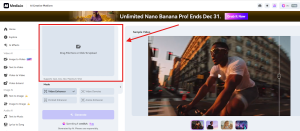
Step 1. Upload Your Problem Video
Navigate to Media.io AI Video Enhancer and drag your blurry MP4 or MOV file directly into the browser. No installation, no upload limits for registered users.
Step 2. Select the Right Enhancement Model
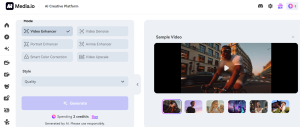
Based on your content, choose options that include Video Enhancer, Video Denoise, Portrait Enhancer, Anime Enhancer, Smart Color Correction, and AI Video Upscale with 1x, 2x, or 4x scaling. Selecting the right model has a significant impact on the final quality.
Step 3. Generate and Download the Enhanced Video
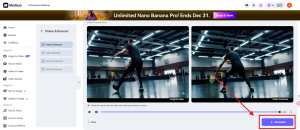
Click Generate and let the AI process your clip. Once complete, you could preview the before-and-after frames and download your enhanced video.
Conclusion: Your Solution for Crystal-Clear Social Content
In the crowded space of AI upscale video solutions, Media.io distinguishes itself through contextual intelligence. It understands that enhancing video quality isn’t an isolated technical task—it’s part of a creator’s journey from idea to engagement.
For social media creators tired of seeing their hard work diminished by compression algorithms, Media.io offers more than just sharper pixels. It offers a complete workflow that respects both the technical and creative sides of content production. With its generous free tier and specialized social media optimizations, it stands as the most practical AI video enhancer for anyone serious about their online video presence.
Try Media.io AI Video Enhancer today and experience the difference between merely uploading videos and strategically deploying content designed to thrive in the social media ecosystem.