
When you open Google, you usually type a query and hit search. But right next to that familiar button sits something many people ignore—the google im feeling lucky button. At first glance, it may look like a fun extra feature, but it actually reflects how confident Google is about its search results.
You might have seen it, hovered over it, and wondered what it really does. Does it pick something at random? Is it useful or just a leftover from the past? These questions are common, especially since the button doesn’t get much attention today.
Still, there’s something oddly appealing about skipping the search results and landing directly on a webpage. That’s exactly what makes this feature different. It removes the middle step and takes you straight to what Google thinks is the best answer.
What Is the Google I’m Feeling Lucky Button?
The google im feeling lucky button is a feature on Google’s homepage that lets you bypass the search results page entirely. Instead of showing you a list of links, it takes you directly to the top-ranked website for your query.
For example, if you type “YouTube” and click the button, you won’t see a list of results. You’ll go straight to YouTube’s homepage. This makes it faster when you already know what you’re looking for.
Unlike a regular search, where you compare multiple options, this feature removes choice. It relies fully on Google’s ranking system to decide the best possible match for your query.
How Does It Work?
When you click the google im feeling lucky button, Google processes your query just like a normal search. The difference is what happens next. Instead of showing results, it immediately redirects you to the first result.
This first result is selected based on Google’s algorithm. The algorithm looks at relevance, authority, and user intent. It tries to understand what you mean and then picks the page most likely to match that intent.
Here’s how it works in simple steps:
- You enter a search query
- Google evaluates the query using its ranking system
- The top result is selected
- You are redirected to that page instantly
There is no delay and no comparison. It’s a one-click shortcut to the most relevant page.
History of the Feature
The google im feeling lucky button has been around since the early days of Google. It was introduced in 1998 when the search engine was still new and trying to stand out.
Back then, Google wanted to show users how accurate its search results were. By letting people skip the results page, it was making a bold statement: “We already know what you’re looking for.”
Over time, the feature stayed, even as Google added more tools and updates. In 2010, when Google Instant was introduced, the button became less visible because results started appearing as you typed.
Even with these changes, the button never disappeared. It remains a small but recognizable part of Google’s identity.
Why Google Created It?
The idea behind the google im feeling lucky button was simple. Google wanted to build trust. If users believed that the first result was always accurate, they would rely more on the search engine.
It also added a human touch. The phrase “I’m feeling lucky” sounds casual and playful. It makes the experience feel less mechanical and more personal.
There was also a practical angle. By encouraging users to trust the top result, Google reduced the need for users to scan multiple links. It was about speed and confidence at the same time.
Where Can You Find this Button Today?
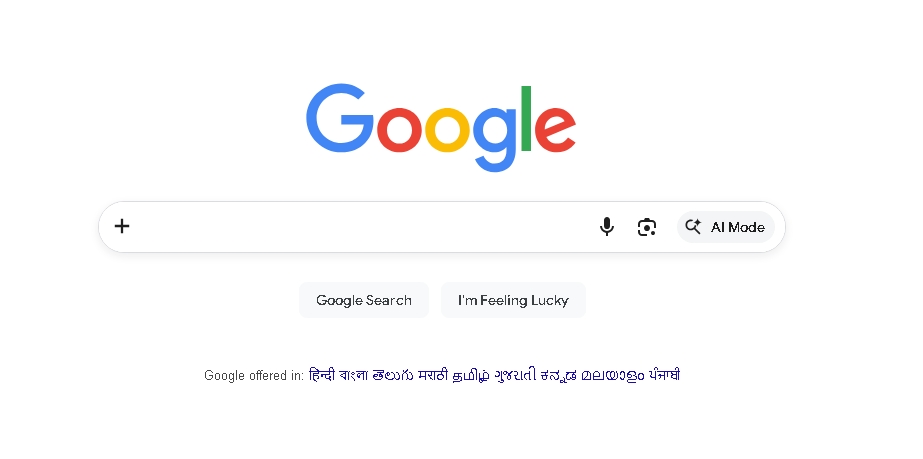
You can still find the google im feeling lucky button on Google’s desktop homepage. It sits right below the search bar, next to the standard search button.
However, if you’re using a smartphone, you might not see it. Mobile versions of Google focus on simplicity and space, so the button is often hidden.
If you want to use it on mobile, you can switch your browser to desktop mode. This will bring back the full homepage, including the button.
Google I’m Feeling Lucky Button vs Regular Search
The biggest difference between the Google im feeling lucky button and a regular search is choice. With a normal search, you see multiple links, compare them, and decide which one to open.
With the lucky button, that decision is made for you. You go straight to the top result without seeing alternatives. This saves time but removes flexibility.
If your goal is quick navigation, the button works well. But if you want detailed information or different viewpoints, the regular search option is the better choice.
Hidden Features and Easter Eggs
Over time, Google added some fun twists to its I’m feeling lucky button. If you hover over it on certain occasions, you may see variations like:
- I’m Feeling Hungry
- I’m Feeling Curious
- I’m Feeling Doodly
These variations take you to different Google services or themed pages. For example, “Hungry” might show food options, while “Curious” may highlight random facts.
There are also playful experiments tied to it, like interactive pages and visual tricks. These aren’t essential, but they make the feature more enjoyable to try.
Advantages of Using Google’s Lucky Button Feature
- Saves time by taking you directly to the top search result
- Eliminates the need to scan multiple links or compare options
- Works best for specific searches like brand names or official websites
- Provides quick access when you already know what you want
- Avoids ads and featured snippets on the search results page
- Offers a clean and distraction-free browsing experience
Disadvantages and Limitations
- Removes control since you cannot choose from multiple results
- May lead to an irrelevant page if the top result isn’t accurate
- Not suitable for broad or research-based queries
- Limits your ability to compare different sources or perspectives
- Often hidden or unavailable on mobile devices
- Less practical for everyday use due to changing search habits
Tips for Better Use
To make the most of this I’m feeling lucky button, you should use precise keywords. The more specific your query, the better the result. For example, typing “Facebook login” or “Amazon India” works better than a general term like “shopping.”
It’s also ideal for proper nouns. Names of companies, websites, or public figures usually lead to accurate results because Google clearly understands the intent behind such queries.
Avoid using it for research-based searches. If you’re looking for information, comparisons, or multiple perspectives, it’s better to stick with the standard search option.
Is the Google I’m Feeling Lucky Button Still Relevant in 2026?
The Googe’s I’m feeling lucky button is still available, but its usage has declined over the years. Most users prefer to see multiple results before making a choice, especially when searching for information.
Mobile search has also changed how people interact with Google. Since the button is less visible on phones, fewer users even notice it. This naturally reduces its role in everyday searches.
Even so, Google has kept the feature. It remains part of the brand’s identity and reflects the original idea of quick and confident search results. While not essential, it still has a place for users who value speed over options.
Interesting Facts You Probably Didn’t Know
Many people are surprised to learn that only a very small percentage of users actually click the google im feeling lucky button. Most prefer to browse results instead of jumping straight to one page.
Another interesting point is that the button skips ads. Since users don’t see the search results page, they also don’t see sponsored listings. This means fewer ad impressions when the feature is used.
The phrase itself is also memorable. It gives a casual, almost playful feel to the search experience, which helped Google stand out in its early days.
Wrapping Up
The google im feeling lucky button may seem like a small feature, but it carries a long history and a clear purpose. It was built on confidence—confidence that the first result is often the right one. For quick searches, it still works well. You skip distractions and reach your destination faster. But for detailed queries, you’ll likely prefer the standard search experience. If you haven’t tried it yet, give it a click. You might find it surprisingly useful in the right situations.
Frequently Asked Questions (FAQs)
Q1. What does the Google I’m Feeling Lucky button do?
It directly takes you to the top-ranked search result instead of showing a list of links. It works as a shortcut to the most relevant webpage for your query.
Q2. Is the Google I’m Feeling Lucky button random?
No, it is not random. It uses Google’s ranking system to select the most relevant and highest-ranked result based on your search term.
Q3. Why can’t I see the I’m Feeling Lucky button on my phone?
On most mobile versions of Google, the button is hidden to keep the interface simple. You can still access it by switching your browser to desktop mode.
Q4. Is it safe to use the Google I’m Feeling Lucky button?
Yes, it is generally safe. It redirects you to a top search result, but like any web page, you should still be cautious about unfamiliar websites.
Q5. Who actually uses the I’m Feeling Lucky button?
It is mostly used by people who already know exactly what they are searching for and want to skip the search results page for faster access.