
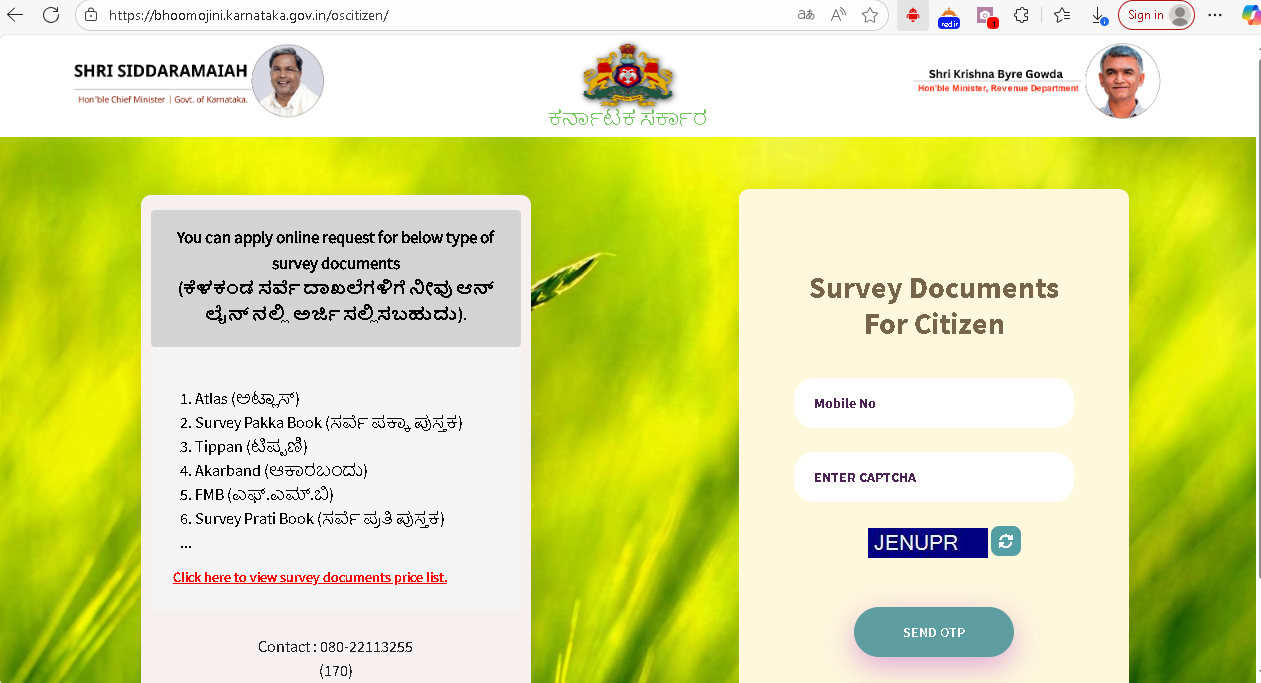
Accessing land records in Karnataka has never been easier thanks to KLR Login Service 137. If you are a property owner, prospective buyer, or government official, this digital service allows you to obtain crucial information about properties directly from the Bhoomi portal, without the hassle of visiting local government offices. From checking ownership details to downloading RTC (Record of Rights, Tenancy, and Crops) documents, Service 137 provides a streamlined, secure, and user-friendly way to manage your land-related tasks.
In today’s fast-paced world, having digital access to property records is not just convenient—it is essential. With the rise of online property transactions, the ability to verify details, track changes, and manage documents online saves both time and effort. In this guide, we will explain in detail how to use KLR Login Service 137, its key features, troubleshooting tips, and how it compares with other login services like Mojini V3. By the end, you will have a complete understanding of how to access and manage Karnataka’s land records efficiently.
What is KLR Login Service 137?
KLR Login Service 137 is an official online portal provided by the Government of Karnataka, specifically designed for accessing land records. The service forms an integral part of Karnataka’s digitized land record management system and is closely linked with the Bhoomi online portal, which provides transparent and reliable land information to citizens.
The service allows users to:
- Access RTC (Pahani) Documents: These records include details on land ownership, tenancy, and crops grown, ensuring you have complete information about the property.
- Check Property Mutation Status: Monitor changes in property ownership due to inheritance, sale, or transfer.
- Submit Survey Requests: Users can request official surveys for their property, helping to resolve disputes or clarify land boundaries.
- Download Certified Copies: Access legally recognized copies of your property documents for official or personal use.
By offering these services digitally, KLR Login Service 137 reduces administrative delays, ensures accuracy, and provides a secure way for citizens and officials to handle property records online.
Key Features of KLR Login Service 137
The platform is packed with practical features designed to make land record management simple and secure:
1. Access to Land Records and RTC (Pahani)
RTC documents are essential for property verification. With KLR Login Service 137, you can:
- View Detailed RTC Records: Input your district, taluk, hobli, village, and survey number to access your land details.
- Check Ownership History: Ensure the property details match official records before purchasing or selling land.
- Download Certified Copies: Obtain digital copies that are valid for legal purposes, saving you from physical paperwork.
2. Property Mutation Tracking
Mutations record changes in property ownership. Service 137 allows you to:
- Track Mutation Status: Monitor the progress of ownership transfers online.
- Access Mutation Extracts: Download official documents that summarize the history of property ownership.
- Ensure Accuracy: Prevent discrepancies in land records, which can be crucial during property disputes.
3. Survey Request Submissions
If you need a land survey to verify boundaries or resolve disputes:
- Submit Online Requests: Avoid lengthy office visits by submitting requests through the portal.
- Track Progress: Check survey completion status in real-time.
- Receive Certified Survey Reports: Download documents confirming the results of the survey.
4. Secure Login and Authentication
Data security is a priority on this portal:
- Username and Password Authentication: Only registered users can access the system.
- CAPTCHA Verification: Ensures that automated bots cannot compromise user accounts.
- Encrypted Access: Protects sensitive property information from unauthorized access.
5. User-Friendly Interface
Even first-time users find the portal easy to navigate:
- Simple Dashboard: Access land records, submit requests, and download documents in a few clicks.
- PDF Downloads: Convenient for storing records offline or submitting documents for official use.
- Responsive Design: Works on desktops, laptops, and mobile devices.
How to Log into KLR Mojini V3 Using Service 137
Accessing your land records through KLR Login Service 137 is straightforward. Here’s a step-by-step guide:
- Visit the Official KLR Portal: Open the authentic Karnataka Land Records website to avoid security risks.
- Select “Service 137 Login”: On the homepage, locate the Service 137 login option to access your account.
- Enter Login Credentials: Provide your registered username and password. If you don’t have an account, complete the registration first.
- Complete CAPTCHA Verification: Enter the code displayed to confirm you are not a robot.
- Access the Dashboard: Once logged in, you can view property details, download RTC documents, submit survey requests, and track mutation status.
Following these steps ensures smooth access to your online property records, saving time and avoiding manual verification processes.
Common Issues and Troubleshooting
While the portal is user-friendly, some users face common challenges. Here’s how to handle them:
- Forgot Password: Click “Forgot Password,” enter your registered email or mobile number, and follow the instructions to reset your password.
- Login Failures: Double-check your username and password. Ensure your account is active.
- CAPTCHA Issues: If the CAPTCHA fails, refresh the page for a new code.
- Portal Downtime: Occasionally, the portal may be under maintenance. Try accessing after some time or use a different browser.
- Download Errors: Ensure a stable internet connection and allow PDF downloads on your browser.
- Technical Support: Persistent issues can be resolved by contacting the KLR helpdesk.
These troubleshooting steps can help you quickly regain access to your land records and continue with property verification or other tasks.
KLR Login Service 137 vs. Mojini V3 Login
Both platforms provide access to Karnataka’s land records but differ in scope and audience:
- Service 137: Focused on citizens, allowing online access to RTC, mutation status, and survey requests.
- Mojini V3: Primarily for government officials, providing tools to manage and update land records across districts.
Key Differences:
| Feature | Service 137 | Mojini V3 |
| Audience | Citizens / property owners | Government officials |
| Access | View and download RTC & mutations | Administrative record updates |
| Complexity | User-friendly | Advanced, requires training |
| Purpose | Property verification | Land record management |
Conclusion
KLR Login Service 137 is a reliable, secure, and essential tool for accessing Karnataka’s land records. By providing easy online access to RTC documents, mutation status, and survey reports, it simplifies property verification and management. Whether you are buying a property, checking ownership, or ensuring legal compliance, this service makes the process faster, safer, and more efficient. With digital access through Service 137, you can manage your land records anytime, anywhere, while staying confident in their authenticity.
Frequently Asked Questions (FAQs)
Q1: What is RTC in Karnataka land records?
RTC (Record of Rights, Tenancy, and Crops) is a detailed document containing information about land ownership, tenancy, and crops grown.
Q2: How can I check the mutation status of my property?
Log in through Service 137, enter your land details, and access the mutation status section to view updates.
Q3: Can I download RTC documents online?
Yes, you can view and download certified RTC copies for legal or personal use through the portal.
Q4: What should I do if I forget my KLR login password?
Use the “Forgot Password” option on the login page and follow the instructions to reset your password securely.
Q5: Is Service 137 available to everyone?
Yes, it is designed for citizens, property owners, and officials with valid registration, providing secure access to Karnataka’s land records.